
5 min read
Better Auth invalid_code: test Google sign-in failures with Playwright
TL;DR: Better Auth turns every failed token exchange into ?error=invalid_code, so a Google outage looks like a bad code. We reproduce it in Playwright with Mockatoo's you+down@…, then fix the message.
For intermediate Next.js developers who use Better Auth's Google sign-in and write Playwright tests.
Your sign-in tests cover the happy path. They don't cover the minute when Google's token endpoint returns 503, because you can't make Google fail on demand.
During that minute, a user clicks "Sign in with Google", picks their account, and lands back on your app at /?error=invalid_code. In our Better Auth + Next.js example, they saw this:
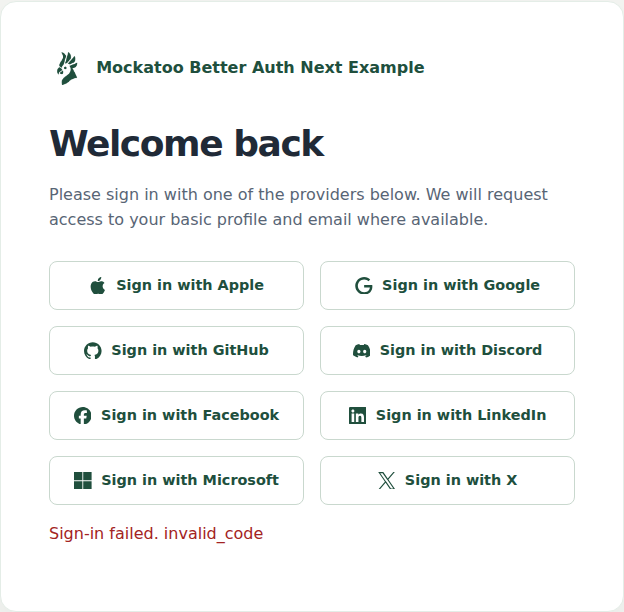
The page doesn't say that Google had a problem, or that trying again will work.
This post reproduces that failure in a Playwright test, then fixes the message. The test signs in through Mockatoo, our mock OAuth provider, which simulates Google's token endpoint failures on demand.
Where invalid_code comes from
After Google redirects back with a code, Better Auth exchanges it for tokens on your server. In better-auth@1.7.7, the exchange is in dist/api/routes/callback.mjs:
let tokens;try { tokens = await provider.validateAuthorizationCode({ code, codeVerifier, deviceId: device_id, redirectURI: `${c.context.baseURL}${getOAuthCallbackPath(provider)}` });} catch (e) { c.context.logger.error("", e); throw redirectOnError(OAUTH_CALLBACK_ERROR_CODES.INVALID_CODE);}Any exception becomes the same redirect. The cause only reaches your server log. This is what Better Auth logged when the token endpoint returned 503:
ERROR [Better Auth]: { error: 'temporarily_unavailable', error_description: 'Service Unavailable', status: 503, statusText: 'Service Unavailable'}And this when the code was bad:
ERROR [Better Auth]: { error: 'invalid_grant', error_description: 'Bad Request', status: 400, statusText: 'Bad Request'}Both sent the browser to /?error=invalid_code. Your page can't tell them apart, so its message has to work for both.
Simulate Google errors on demand
Clone the example and install Chromium for Playwright:
git clone https://github.com/mockatoo/examples.gitcd examples/better-auth-nextpnpm installpnpm exec playwright install chromiumThe example's committed .env sets MOCKATOO_URL, which points Better Auth's Google provider at Mockatoo instead of Google (see lib/auth.ts). Create a Mockatoo test account, then add .env.local:
BETTER_AUTH_SECRET=<output of openssl rand -base64 32>MOCKATOO_TEST_EMAIL=<your Mockatoo test email>MOCKATOO_TEST_PASSWORD=<your Mockatoo test password>Mockatoo's email tags let one test account trigger simulated provider behavior at sign-in. For example, signing in as you+down@example.com with your usual password makes Mockatoo's simulated Google token endpoint return 503. The email tags docs list the other tags.
Write a Playwright test for a Google outage
Add tests/google-failures.spec.ts:
import nextEnv from "@next/env";import { expect, type Page, test } from "@playwright/test";nextEnv.loadEnvConfig(process.cwd());const email = process.env.MOCKATOO_TEST_EMAIL ?? "";const password = process.env.MOCKATOO_TEST_PASSWORD ?? "";// you@example.com -> you+down@example.comconst withTag = (tag: string) => email.replace("@", `+${tag}@`);async function signInWithGoogle(page: Page, address: string) { await page.goto("/"); await page.getByRole("button", { name: "Sign in with Google" }).click(); await page.locator("#email").fill(address); await page.locator("#password").fill(password); await page.getByRole("button", { name: "Log in with password" }).click(); await page.getByRole("button", { name: "Authorize" }).click();}test("tells the user to retry when Google's token endpoint is down", async ({ page,}) => { await signInWithGoogle(page, withTag("down")); await expect(page).toHaveURL(/\?error=invalid_code$/); await expect( page.getByRole("alert").filter({ hasText: "Try again in a minute" }), ).toBeVisible(); await expect(page.getByText("You are logged in")).toBeHidden();});test("waits out a slow token endpoint", async ({ page }) => { await signInWithGoogle(page, withTag("slow")); await expect(page.getByText("You are logged in")).toBeVisible({ timeout: 15_000, });});Run it with pnpm exec playwright test tests/google-failures.spec.ts. The example's Playwright config builds and starts the app first. The outage test fails, because the URL is right but the page still prints the raw code:
✘ tells the user to retry when Google's token endpoint is down (7.8s)✓ waits out a slow token endpoint (13.1s)Error: expect(locator).toBeVisible() failedLocator: getByRole('alert').filter({ hasText: 'Try again in a minute' })Expected: visibleError: element(s) not foundMap Better Auth error codes to messages users can act on
The example's app/sign-in.tsx printed the code. Replace that with a lookup:
+// Better Auth redirects with ?error=invalid_code whenever the token exchange+// fails: a provider outage, a timeout, or a bad code. The URL can't tell them+// apart, so say what the user can do about all of them.+const ERROR_MESSAGES: Record<string, string> = {+ invalid_code: "Sign-in failed before it finished. Try again in a minute.",+ access_denied: "Sign-in failed because you cancelled it.",+};++function errorMessage(code: string) {+ return ERROR_MESSAGES[code] ?? "Sign-in failed. Please try again.";+}+ export default function SignIn({@@- const [message, setMessage] = useState(- error ? `Sign-in failed. ${error}` : "",- );+ const [message, setMessage] = useState(error ? errorMessage(error) : "");access_denied is what Google sends when the user clicks Cancel on the consent screen. Run the tests again:
✓ tells the user to retry when Google's token endpoint is down (4.1s)✓ waits out a slow token endpoint (13.8s)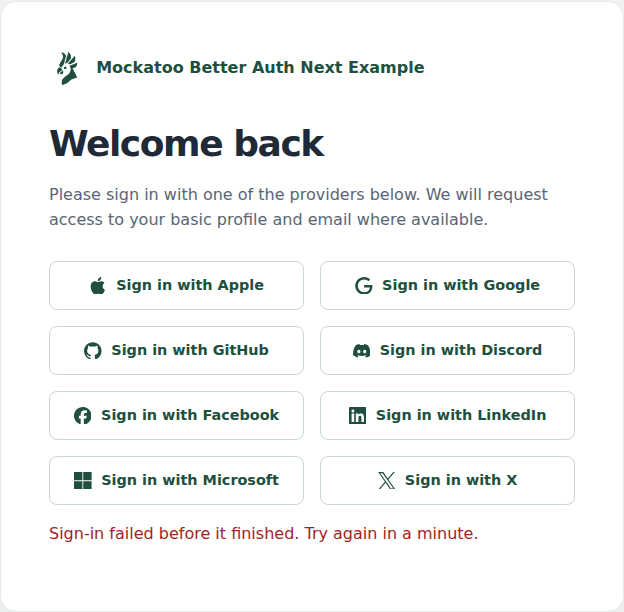
What Better Auth does with other Google failures
The same test can sign in with other tags. We ran each one against the example, unchanged except for the message:
| Address | What the mock Google does | What Better Auth 1.7.7 does |
|---|---|---|
you+down@… | Token endpoint returns 503 | Redirects to ?error=invalid_code |
you+flaky@… | First exchange of each code returns 503; a retry with the same code succeeds | Redirects to ?error=invalid_code, with no retry |
you+badcode@… | Token endpoint returns 400 invalid_grant | Redirects to ?error=invalid_code |
you+slow@… | Token response arrives after 10 seconds | Signs in, about 11 seconds end to end |
+flaky shows that Better Auth doesn't retry the exchange. We didn't add a retry: OAuth says a client must not use a code more than once, and we haven't confirmed what Google does with a code after a 503.
+slow passed here. Keep it anyway if a proxy or function timeout in front of your app cuts requests at under 10 seconds.
Limits of a mock Google
- The mock isn't Google. It copies Google's token-endpoint responses, and the Google page lists where it differs. It can't reproduce every way Google fails, such as a partial outage that only some users see.
- It tests your app, not Google. It won't tell you Google is down in production. The 503 detail is only in your server log, so alert on that.
- Development and testing only. The example uses real Google when
MOCKATOO_URLisn't set, and the example's.envsays never to set it in production. - Tags need a
+. If your app strips+tagsfrom email addresses, every tagged address becomes the same user.
Run the test against your own app
The test and the message change are in the Better Auth + Next.js example. To run the same test against your app, create a Mockatoo test account and point your Google provider at it.